Scrinium vs Google Keep: when the free option costs more than it looks
Keep is the fastest way to capture a thought and the least private place to keep it. Scrinium trades a little speed for notes the operator cannot read.
The short answer
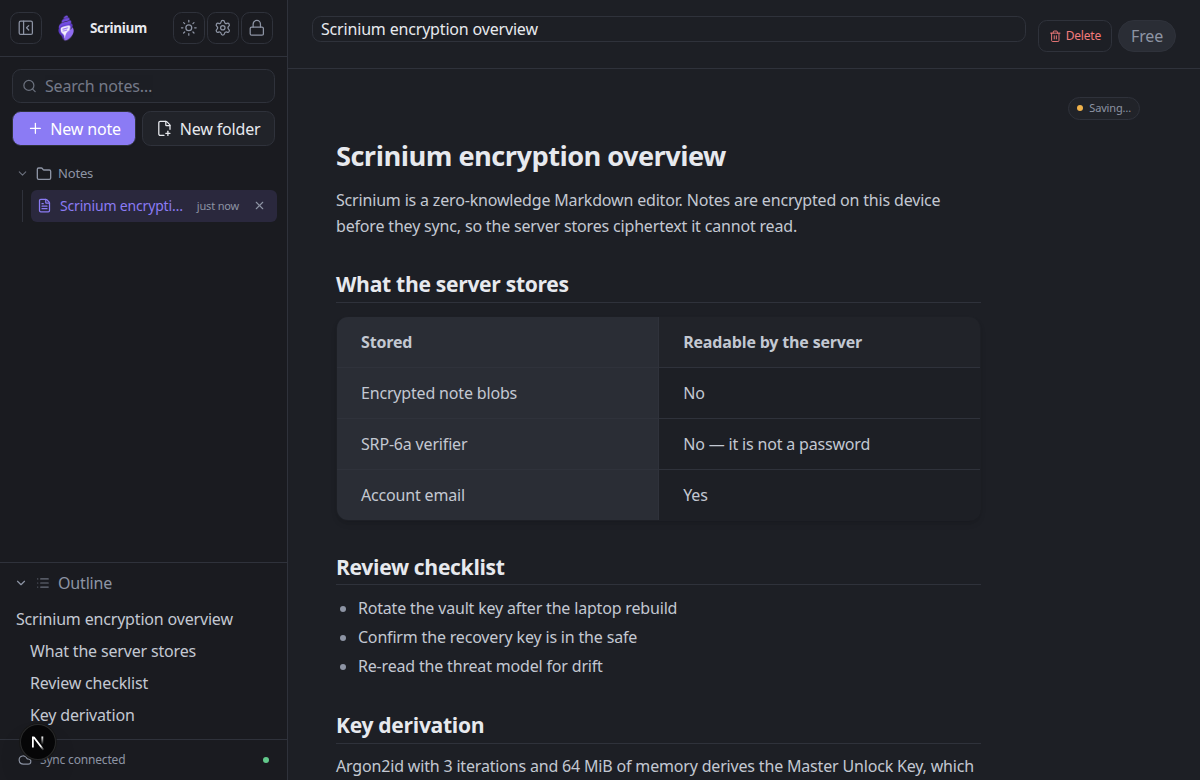
Google Keep is the fastest way to capture a thought and the least private place to keep it. Notes are encrypted in transit and at rest with keys Google manages, there is no end-to-end encryption, and the content sits inside the same account as your mail, files and search history. Free is a real trade here, not a hidden one. Scrinium encrypts each note on your device with its own 32-byte key, wrapped by a vault key derived with Argon2id (3 iterations, 64 MiB of memory) and sealed with XChaCha20-Poly1305; the server stores ciphertext and an SRP verifier, so it cannot read a note even if it is compelled to hand it over. Keep also has no Markdown, no code blocks and a ceiling on how long a note can be. Use Keep for the shopping list. For journals, client notes, drafts and anything you would think twice about pasting into a free service, use a notebook whose lock you hold.
Scrinium vs Google Keep · Reviewed October 2026 · 4 min read
Choose Google Keep if…
You want a free sticky-note pad that syncs instantly and you are comfortable with Google holding the content of your notes.
Choose Scrinium if…
Your notes are the kind you would not paste into a Google product, or you want Markdown, structure, and a format that outlives the app.
Google Keep vs Scrinium at a glance
| Criterion | Google Keep | Scrinium |
|---|---|---|
| Content encrypted end to end | No: No end-to-end encryption | Yes: Yes — encrypted on your device before it syncs |
| Zero-knowledge (the service cannot read notes) | No: No — Google holds the keys and can access content | Yes: Yes — keys never leave your device |
| Free sync across all your devices | Yes: Free and instant across devices | Yes: Yes — unlimited notes, devices, and sync |
| Markdown that renders inline as you type | No: Plain text and checklists — no Markdown, tables, or code | Yes: Yes — Typora-style WYSIWYG, no preview pane |
| Export in an open format | Partly: Takeout export as HTML or JSON, no Markdown | Yes: Yes — Markdown, plaintext or re-encrypted |
| Open source | No: Closed platform service | No: No — closed source, but the threat model and crypto design are published in full |
Competitor products change. These notes were reviewed in October 2026 — check the vendor’s own site for current pricing, limits, and features before you decide.
Is Google Keep end-to-end encrypted?
Google Keep is encrypted in transit and at rest using keys Google manages. That is the same protection level as most consumer cloud services, and it means the content of your notes is reachable by the operator — for product features, for automated processing, in response to legal process, or through a compromise of the account or the service. There is no end-to-end encryption option for notes.
The second consideration is the account itself, not the cryptography. A Keep note lives inside a Google account that is also your email, your files, and your search history, protected by one password and one recovery flow. Losing that account means losing the notes with it, and the blast radius is everything at once.
Scrinium separates the two. The notes vault is encrypted with keys derived from a password that only unlocks the notebook, the server receives ciphertext and a login verifier, and a recovery key exists specifically so that forgetting a password does not mean losing the notes.
Scrinium’s encryption, in specifics
- Key derivation
- Argon2id, 3 iterations, 64 MiB of memory, 16-byte salt
- Key hierarchy
- 32-byte keys: Master Unlock Key → Account Key → Vault Key → per-note Note Key
- Encryption
- XChaCha20-Poly1305 AEAD with a 24-byte nonce on every note, title and attachment
- Recovery
- BLAKE2b-256 recovery key that unwraps the Account Key without the password
- Limits
- 5 MiB per encrypted note, 5 MiB per attachment, last 30 revisions inside the blob
Can Google Keep read your notes?
Keep’s export through Google Takeout produces HTML or JSON. It is a real export and it is not a useful archive: no Markdown, no clean structure, and one file per note in a folder tree that takes work to reassemble.
There is also the platform question that comes with every free service. A product that is free at this scale is funded by the ecosystem around it, and its roadmap is set somewhere other than its users.
Scrinium stores Markdown and exports Markdown. The notes move to any editor without conversion, nothing about them depends on a proprietary container, and the format is older than the product.
Does Google Keep have a Markdown editor?
Keep is optimised for capture. There is no Markdown, no code fences, no tables, no nested structure beyond lists and checkboxes, and there is a character ceiling on a note. For a phone number, a recipe, or a checklist on the way out of the door, that is exactly right.
Scrinium is optimised for the notes you return to. Inline Markdown rendering while you type, syntax-highlighted code, tables, task lists, math and diagrams, folding for long documents, and local full-text search that runs over decrypted notes in memory.
What does Google Keep cost?
Keep is free, at the cost of being a Google service with the account and data relationship that implies.
Scrinium is also free, with unlimited notes, unlimited encrypted sync, and unlimited devices — and the free tier does not depend on analysing your content. Paid tiers add features such as encrypted attachments, version history, burner notes, and a graph view.
When is Google Keep the better choice?
Keep is the right tool for friction-free capture: a shopping list shared with a partner, a photo of a receipt, a note-to-self on the way to a meeting. It is fast, it loads everywhere, and it asks nothing of you.
If your notes are throwaway and unremarkable, paying for privacy would be theatre. Keep them where they are.
When is Scrinium the better choice?
Choose Scrinium for the notes that accumulate meaning: journals, client notes, research, drafts, decisions, anything you would think twice about pasting into a free web service. Those notes deserve a format you own and a server that cannot read them.
It is also the better fit once your notes need structure — headings, tables, code — because Keep’s plain-text model starts costing you time the moment a note wants to be a document.
How do I move my notes from Google Keep to Scrinium?
Export from Google Takeout and you get HTML and JSON copies of every note. Convert the HTML to Markdown with any of the common converters, or paste the notes that matter — Keep libraries are usually smaller than they feel.
Import the Markdown into Scrinium, and keep the Takeout archive as a backup until you are satisfied nothing was missed. Shared lists are the usual casualty and are worth checking by hand.
Questions people ask
Is Google Keep end-to-end encrypted?
No. Keep is encrypted at rest and in transit with keys Google manages, which means Google can access note content. Scrinium encrypts each note on your device with keys the server never receives.
Is there a private alternative to Google Keep?
Yes. Scrinium is a zero-knowledge, end-to-end encrypted notes app with a free unlimited tier. It is a Markdown editor rather than a sticky-note pad, so it holds up better as your notes get longer-lived.
Can I export my Google Keep notes?
Yes, through Google Takeout, which produces HTML and JSON rather than Markdown. Converting to Markdown and importing into Scrinium is a short job for a typical Keep library.
Free, unlimited encrypted sync. No card, no note cap — and the server cannot read a word of it.
Keep reading
Google Keep is a trademark of its owner. Scrinium is not affiliated with Google Keep, and nothing here implies endorsement in either direction.