Scrinium vs Anytype: both encrypted and local-first, only one is a notebook
Anytype invites you to build your own knowledge system out of objects and relations. Scrinium stays a Markdown notebook — encrypted, but deliberately small.
The short answer
Anytype is an encrypted, local-first object workspace: data lives on your device, syncs peer to peer or through a node you can run, and the model is objects, types and relations rather than files. If you want to build a system — a research base, a personal CRM, a life-OS with dashboard views — it is far more capable than a notebook, and its encryption commitments match its ambition. The trade is the learning curve and the format: a Markdown export flattens relations, so your data only fully makes sense inside Anytype. Scrinium stays deliberately small. Notes are Markdown files, encrypted on the device under per-note keys wrapped by a vault key derived with Argon2id (3 iterations, 64 MiB of memory), sealed with XChaCha20-Poly1305, with the last 30 revisions kept inside the encrypted blob. Open it and write; export it and nothing is lost in translation.
Scrinium vs Anytype · Reviewed October 2026 · 4 min read
Choose Anytype if…
You want to model your own structures — objects, types, sets, relations — and you enjoy building the system as much as using it.
Choose Scrinium if…
You want an encrypted notebook you understand in the first five minutes, with Markdown files underneath and an editor that renders as you type.
Anytype vs Scrinium at a glance
| Criterion | Anytype | Scrinium |
|---|---|---|
| Content encrypted end to end | Yes: Yes — encrypted local-first data with your keys | Yes: Yes — encrypted on your device before it syncs |
| Zero-knowledge (the service cannot read notes) | Yes: Yes — the service stores encrypted objects | Yes: Yes — keys never leave your device |
| Free sync across all your devices | Partly: Free tier has a storage allowance; more sync means a paid tier | Yes: Yes — unlimited notes, devices, and sync |
| Markdown that renders inline as you type | Partly: Markdown shortcuts in a block editor, not Markdown files | Yes: Yes — Typora-style WYSIWYG, no preview pane |
| Export in an open format | Partly: Markdown export, lossy for objects and relations | Yes: Yes — Markdown, plaintext or re-encrypted |
| Open source | Yes: Published code and a self-hostable sync node | No: No — closed source, but the threat model and crypto design are published in full |
Competitor products change. These notes were reviewed in October 2026 — check the vendor’s own site for current pricing, limits, and features before you decide.
Is Anytype end-to-end encrypted?
Anytype gets the fundamentals right. Data lives locally, is encrypted with keys you control, and syncs peer to peer or through the project’s own node without handing over plaintext. It is one of the few products in this list where the encryption claim is architectural rather than a policy.
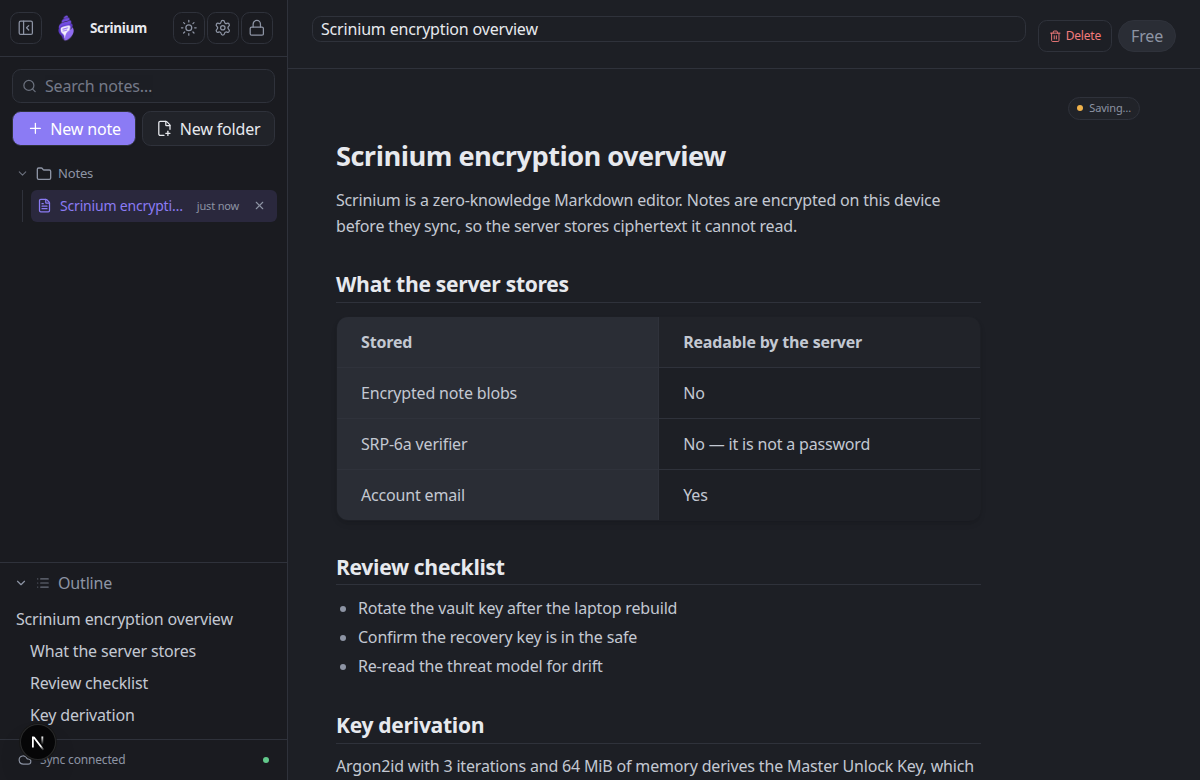
Scrinium shares that architecture and differs on what gets encrypted. Every note is sealed under its own key before storage, keys live only in memory while unlocked, and the server holds ciphertext and a login verifier. Recovery and rotation are handled: a BLAKE2b recovery key survives a forgotten password, and changing a password re-wraps the hierarchy.
Neither product will let a server read your notes. The practical question is whether the app around the encryption gives you what you need on a Tuesday afternoon.
Scrinium’s encryption, in specifics
- Key derivation
- Argon2id, 3 iterations, 64 MiB of memory, 16-byte salt
- Key hierarchy
- 32-byte keys: Master Unlock Key → Account Key → Vault Key → per-note Note Key
- Encryption
- XChaCha20-Poly1305 AEAD with a 24-byte nonce on every note, title and attachment
- Recovery
- BLAKE2b-256 recovery key that unwraps the Account Key without the password
- Limits
- 5 MiB per encrypted note, 5 MiB per attachment, last 30 revisions inside the blob
Can Anytype read your notes?
Anytype’s promise is that your knowledge graph belongs to you: local storage, published code, and a sync node you can run yourself. On those terms it is one of the strongest offers in the category.
The tension is the data model. Because the unit is an object with types and relations rather than a file, your data only fully makes sense inside Anytype. Export writes Markdown, and relations, sets, and views degrade in translation — the same lossiness problem that proprietary formats have always had, arrived at from an unusually principled direction.
Scrinium’s unit is the Markdown file, so the export is not a translation of the data, it is the data. Nothing is lost on the way out because nothing needs converting.
Does Anytype have a Markdown editor?
Anytype is a block editor with Markdown affordances: a page is a tree of objects, and formatting is structural rather than textual. That is what makes sets, relations, and dashboards possible, and it is also why writing in it feels like operating software.
Scrinium is a document editor. You type Markdown and it renders inline — headings, lists, task lists, tables, fenced code with syntax highlighting, blockquotes, images, math and diagrams — with folding, a graph built from [[wikilinks]] on Pro, and local search over decrypted content.
What does Anytype cost?
Anytype is free to start with a storage allowance for sync and backup, and paid tiers raise that allowance and add features. For a large vault across several devices, the allowance is the thing to check.
Scrinium’s free tier puts no allowance on notes: unlimited notes, unlimited encrypted sync, unlimited devices. Paid tiers add features — encrypted attachments, version history, burner notes, graph view, math and diagrams — rather than capacity for your own text.
When is Anytype the better choice?
Choose Anytype if you are building a system: a research base, a personal CRM, a reading database, a life-OS with dashboards. Its object model is a genuine advance over folders and tags, and its encryption commitments match its ambitions.
It is also worth choosing if you enjoy the craft of configuring an environment. The setup is part of the appeal rather than a cost.
When is Scrinium the better choice?
Choose Scrinium if you want to open the app and write. The vault is encrypted from the first keystroke, the editor renders what you type, search is instant and local, and there is nothing to model before you can take a note.
It is also the better fit for Markdown as a long-term format: files that any editor can open, that survive the app, and that do not need a conversion pass to become portable.
How do I move my notes from Anytype to Scrinium?
Anytype exports to Markdown, and that is the import path into Scrinium. Expect structure loss at the boundaries — relations, sets, and object types do not map onto Markdown — so export the documents you care about and treat anything relational as an archive.
If your vault is large, export by space and import selectively; a fresh encrypted notebook is a better destination than a dump of everything at once.
Questions people ask
Is Anytype encrypted like Scrinium?
Both are encrypted and local-first with keys held by you rather than the service. Scrinium adds a browser-first app, per-note keys wrapped through an Argon2id-derived hierarchy, and Markdown as the storage format.
What is the difference between Anytype and a Markdown notes app?
Anytype models knowledge as objects, types, and relations, which is powerful and proprietary in shape. A Markdown notes app stores documents as plain text files, which is far less flexible and far more portable.
Which is easier to learn?
Scrinium. There is no schema to design before writing, no object model to internalise, and no build-your-own-workspace step. Anytype rewards time invested in it, and asks for that time up front.
Free, unlimited encrypted sync. No card, no note cap — and the server cannot read a word of it.
Keep reading
Anytype is a trademark of its owner. Scrinium is not affiliated with Anytype, and nothing here implies endorsement in either direction.