Scrinium vs Joplin: the same principles, two very different first runs
Both encrypt end to end: Joplin is open source, while Scrinium is closed source with its cryptography published for review. Joplin hands you the switchboard; Scrinium has the privacy on before you type.
The short answer
Joplin is open source, self-hostable and genuinely private once you configure it: end-to-end encryption is opt-in, and sync is a target you choose and maintain, so nothing leaves your control unless you decide it should. That is a real advantage if you want to own the operations. The cost is the first run and the editor, which is a Markdown source pane with a preview rather than formatting that renders in place. Scrinium is closed source and hosted, so it cannot compete on sovereignty; it competes on defaults and writing. Encryption is not a switch — notes are sealed under a per-note key, with the vault key derived by Argon2id (3 iterations, 64 MiB of memory) and payloads encrypted with XChaCha20-Poly1305, capped at 5 MiB per note. Free sync is unlimited, and Markdown renders inline as you type. Choose Joplin to own the server; choose Scrinium so you never think about one.
Scrinium vs Joplin · Reviewed October 2026 · 4 min read
Choose Joplin if…
You want a free open-source app you control completely and you are happy choosing a sync target, enabling encryption, and managing the moving parts.
Choose Scrinium if…
You want the same guarantees working out of the box, with an editor built for writing rather than a Markdown pane.
Joplin vs Scrinium at a glance
| Criterion | Joplin | Scrinium |
|---|---|---|
| Content encrypted end to end | Partly: Available and strong, but off until you enable it | Yes: Yes — encrypted on your device before it syncs |
| Zero-knowledge (the service cannot read notes) | Partly: Yes for synced items once enabled; the local database is not encrypted | Yes: Yes — keys never leave your device |
| Free sync across all your devices | Partly: Free if you bring your own storage; hosted sync is a subscription | Yes: Yes — unlimited notes, devices, and sync |
| Markdown that renders inline as you type | Partly: Markdown source editor plus a separate rich-text mode | Yes: Yes — Typora-style WYSIWYG, no preview pane |
| Export in an open format | Yes: Markdown and JEX archives | Yes: Yes — Markdown, plaintext or re-encrypted |
| Open source | Yes: Open source and self-hostable, including the sync server | No: No — closed source, but the threat model and crypto design are published in full |
Competitor products change. These notes were reviewed in October 2026 — check the vendor’s own site for current pricing, limits, and features before you decide.
Is Joplin end-to-end encrypted?
Joplin takes encryption seriously, which is why it appears on every honest list of private note apps. The nuance is procedural rather than cryptographic: end-to-end encryption is opt-in. A fresh install syncs without it until you enable encryption in the settings and let it run across your notes.
Once enabled, synced items are encrypted with a master key protected by your password, and your sync target sees ciphertext. The local profile is a different story — the working database on disk is not encrypted by default — so the same laptop caveats apply.
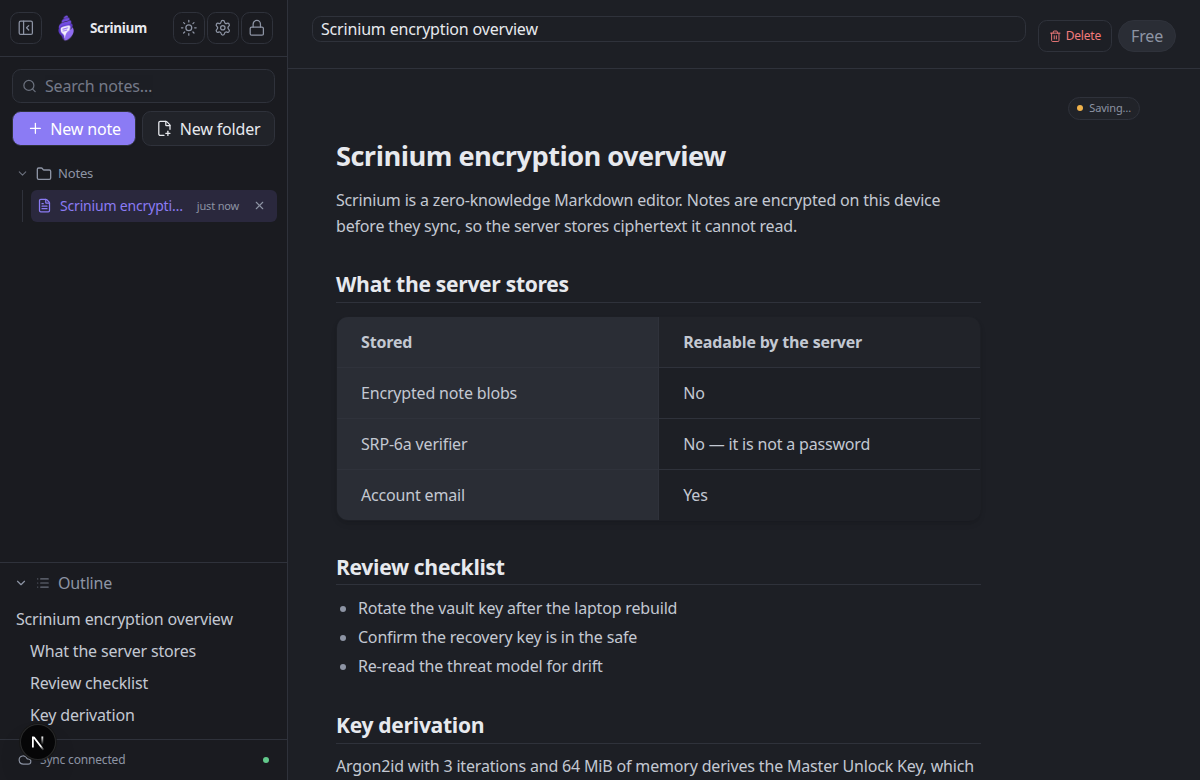
Scrinium is the same architecture with the switch removed. Encryption is not a setting: notes are sealed before they are stored or synced, the note keys are wrapped by a vault key that exists only in memory, and there is no state in which your content is sitting somewhere unencrypted because a toggle was missed.
Scrinium’s encryption, in specifics
- Key derivation
- Argon2id, 3 iterations, 64 MiB of memory, 16-byte salt
- Key hierarchy
- 32-byte keys: Master Unlock Key → Account Key → Vault Key → per-note Note Key
- Encryption
- XChaCha20-Poly1305 AEAD with a 24-byte nonce on every note, title and attachment
- Recovery
- BLAKE2b-256 recovery key that unwraps the Account Key without the password
- Limits
- 5 MiB per encrypted note, 5 MiB per attachment, last 30 revisions inside the blob
Can Joplin read your notes?
Joplin wins on ownership and it is not close. The app, the sync server, and the storage layout are yours to run, notes export to Markdown or JEX, and the project’s longevity does not depend on a company. If self-sovereignty is the requirement, this is one of very few credible answers.
Scrinium aims at the same independence from the other direction. The sync backend is an encrypted blob store with a FileStore option, so you can run it yourself; notes are Markdown; and the client is small enough to be inspected rather than trusted.
The difference is who absorbs the operational work. Joplin puts storage, sync, encryption, and conflict handling in the user’s hands. Scrinium makes those choices for you and gives you the exit door if you want to take them back.
Does Joplin have a Markdown editor?
Joplin has two editors: a Markdown editor with a preview pane, and a rich-text mode that renders some formatting. Neither is a true inline Markdown WYSIWYG, and moving between them is a decision the user makes per note. On mobile the interface is functional rather than comfortable.
Scrinium renders Markdown in place as you type with no preview pane and no mode switch. Tables, task lists, code fences, math, diagrams, images, and headings are formatted on the same surface you are typing on, and the layout adapts to a phone rather than being shrunk onto it.
What does Joplin cost?
Joplin’s software is free. You pay only if you want Joplin Cloud, and otherwise you supply storage through Dropbox, OneDrive, Nextcloud, WebDAV, or an S3 bucket — free at the point of use and entirely your responsibility.
Scrinium runs the storage for you on the free tier: unlimited notes, encrypted sync, unlimited devices, no subscription and no bucket to configure. Paid tiers add features — attachments, version history, burner notes, graph view, math and diagrams — rather than paying to keep your own notes in sync.
When is Joplin the better choice?
Choose Joplin if you want to run everything: no vendor at all, your own sync target, a community project with years of history, and the web clipper ecosystem around it. It is also the better answer if you need a fully offline desktop app that works with no network and no account.
If your definition of privacy extends to “nobody else should even hold the ciphertext”, Joplin is the more complete answer and Scrinium will not pretend otherwise.
When is Scrinium the better choice?
Choose Scrinium if you want the encryption guarantee without owning the operations. Most people who plan to run their own sync server eventually stop maintaining it; Scrinium runs the sync, cannot read your notes, and hands you the Markdown whenever you want it.
It is also the better fit for writing-heavy use: an inline Markdown editor rather than a source editor plus preview, local full-text search over decrypted content, and a consistent experience across desktop, tablet, and phone browsers.
How do I move my notes from Joplin to Scrinium?
Joplin exports Markdown files and JEX archives — open both in Scrinium by importing the Markdown, since JEX is meant for Joplin itself. Importing a JEX archive would need a conversion step.
A pragmatic route for a large library is to export by notebook, import the notebooks you actually revisit, and leave the archive of everything exported as a cold backup.
Questions people ask
Is Joplin end-to-end encrypted?
Yes, once you enable it — Joplin’s encryption is opt-in and has to be turned on and allowed to synchronise across your notes. Scrinium encrypts every note on your device from the first save, with no setting to enable.
Is there an encrypted notes alternative to Joplin that needs no setup?
Yes — Scrinium is a hosted, zero-knowledge notes app with an inline Markdown WYSIWYG editor rather than a Markdown source pane and preview. It is closed source, where Joplin is open source; it publishes its threat model and cryptography design instead.
Which is easier to set up?
Scrinium: create a vault and start writing, with encrypted sync working immediately. Joplin rewards the setup effort with total control, but you choose and configure a sync target, enable encryption, and keep it working.
Free, unlimited encrypted sync. No card, no note cap — and the server cannot read a word of it.
Keep reading
Joplin is a trademark of its owner. Scrinium is not affiliated with Joplin, and nothing here implies endorsement in either direction.