Scrinium vs Notesnook: two private note apps, one Markdown problem
Notesnook and Scrinium make the same privacy promise at the same price point. The difference is the editor, and for Markdown writers it decides the choice.
The short answer
Notesnook and Scrinium make the same promise at a similar price: notes encrypted on the client, ciphertext on the server, a genuinely usable free tier. Notesnook is open source; Scrinium is closed source and publishes its threat model and cryptography design instead. The difference that decides it is the editing model. Notesnook’s editor treats Markdown as input — you type syntax and it applies — rather than as the document, so a note that mixes tables, code fences and task lists may not round-trip exactly. Scrinium stores Markdown and renders it inline as you type, under a hierarchy of Argon2id (3 iterations, 64 MiB of memory) to a Master Unlock Key, then an account key, a vault key and a per-note key, all sealed with XChaCha20-Poly1305 and capped at 5 MiB per note. If you want rich text with Markdown conveniences, Notesnook is comfortable. If Markdown is how you think, Scrinium keeps the file and the rendering identical.
Scrinium vs Notesnook · Reviewed October 2026 · 4 min read
Choose Notesnook if…
You want a private notes app with a familiar rich-text feel, tagging, and mobile apps that behave like native clients.
Choose Scrinium if…
Markdown is how you think, and you want the file you write to be the file you keep — in an editor that renders it as you go.
Notesnook vs Scrinium at a glance
| Criterion | Notesnook | Scrinium |
|---|---|---|
| Content encrypted end to end | Yes: Yes — client-side encryption with your password | Yes: Yes — encrypted on your device before it syncs |
| Zero-knowledge (the service cannot read notes) | Yes: Yes — the server stores encrypted notes | Yes: Yes — keys never leave your device |
| Free sync across all your devices | Partly: Usable free tier; advanced extras sit behind the paid plan | Yes: Yes — unlimited notes, devices, and sync |
| Markdown that renders inline as you type | Partly: Markdown shortcuts in a rich-text editor, not inline Markdown WYSIWYG | Yes: Yes — Typora-style WYSIWYG, no preview pane |
| Export in an open format | Yes: Markdown, HTML, and PDF export | Yes: Yes — Markdown, plaintext or re-encrypted |
| Open source | Yes: Open source client and sync infrastructure | No: No — closed source, but the threat model and crypto design are published in full |
Competitor products change. These notes were reviewed in October 2026 — check the vendor’s own site for current pricing, limits, and features before you decide.
Is Notesnook end-to-end encrypted?
Notesnook belongs on any shortlist for private notes. Content is encrypted on the client with a key derived from your password, the sync server holds ciphertext, and the project has been open about its design. There is no meaningful security gap to exploit here and no reason to imply one.
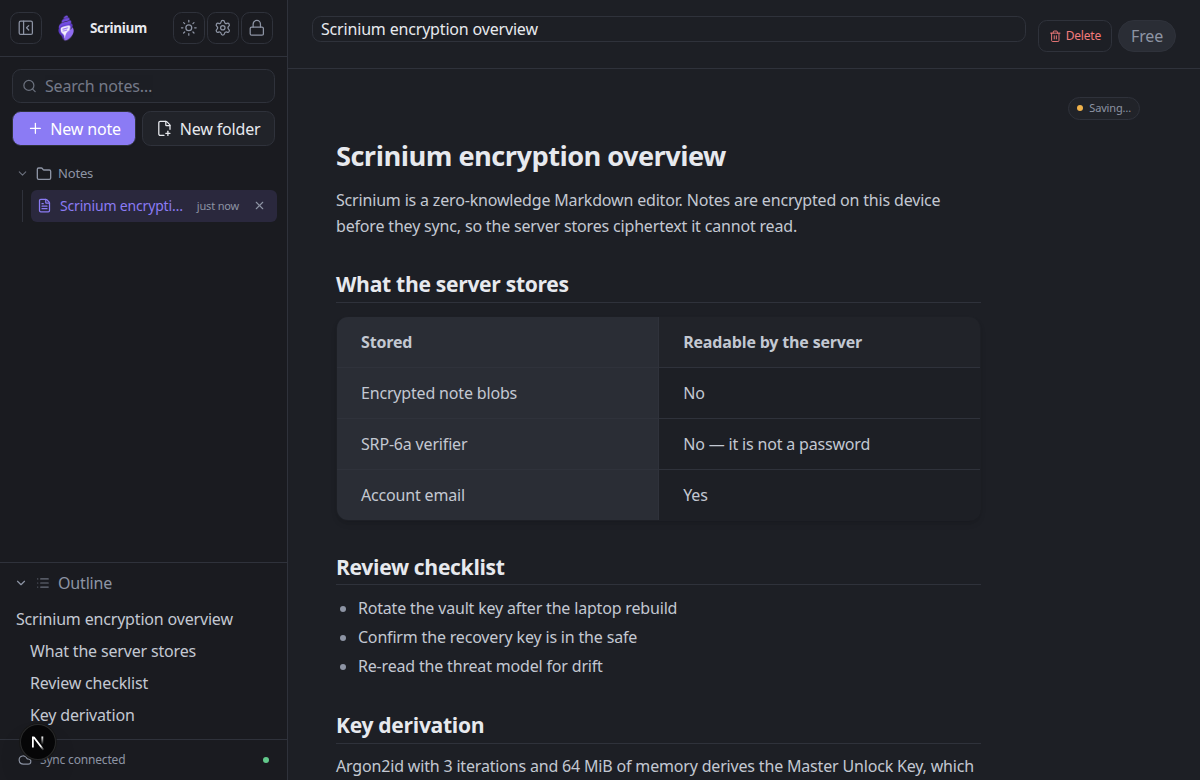
The models differ in detail rather than in guarantee. Scrinium derives a master unlock key with Argon2id, unwraps an account key, a vault key, and then a per-note key, keeps every key out of persistent storage so nothing but the ciphertext survives a refresh, and verifies integrity on every decrypt. The result is the same promise: the server cannot read your notes, and it can prove that it cannot.
If your requirement is “the vendor must not be able to read my notes”, both products pass. If your requirement includes a published threat model and a crypto design you can read next to the source, Scrinium publishes both.
Scrinium’s encryption, in specifics
- Key derivation
- Argon2id, 3 iterations, 64 MiB of memory, 16-byte salt
- Key hierarchy
- 32-byte keys: Master Unlock Key → Account Key → Vault Key → per-note Note Key
- Encryption
- XChaCha20-Poly1305 AEAD with a 24-byte nonce on every note, title and attachment
- Recovery
- BLAKE2b-256 recovery key that unwraps the Account Key without the password
- Limits
- 5 MiB per encrypted note, 5 MiB per attachment, last 30 revisions inside the blob
Can Notesnook read your notes?
Notesnook exports well for a private notes app — Markdown, HTML, and PDF — and the client is open source. Your data is not held hostage.
Once again the dividing line is what the note actually is. Notesnook’s document is a rich-text model that accepts Markdown as input, so Markdown syntax is a convenience on the way in and an approximation on the way out. Round-tripping a note that mixes tables, code fences, and task lists will not always return what you wrote.
In Scrinium the Markdown is the document. Export is a copy rather than a conversion, and there is no intermediate model that can reinterpret your formatting.
Does Notesnook have a Markdown editor?
Notesnook’s editor is pleasant and works like a modern note app: formatted text, tags, notebooks, attachments, and mobile clients that feel native. Markdown is supported as input — you can type syntax and it applies — but the experience is rich text with shortcuts rather than a page that renders Markdown as you type it.
Scrinium commits fully to the other model. Tables, task lists, fenced code with syntax highlighting, blockquotes, images, math and diagrams render in place while you type, and the underlying note stays valid Markdown. For people who read and write Markdown deliberately — developers, researchers, technical writers — that consistency is the whole point.
What does Notesnook cost?
Notesnook’s free tier is genuinely usable and its paid plan is aimed at heavier use, with additional storage and features.
Scrinium charges for the same class of advanced features — encrypted attachments, version history, burner notes, graph view, math and diagrams — and keeps the core free and unlimited: notes, sync, devices, and the Markdown WYSIWYG editor included rather than gated.
When is Notesnook the better choice?
Choose Notesnook if you prefer rich text with Markdown conveniences, want native-feeling mobile apps, and value a maturing product that is already comfortable for non-technical note-taking.
It is also the easier recommendation for someone who has never written Markdown and has no intention of starting — a private notebook should not require a syntax lesson.
When is Scrinium the better choice?
Choose Scrinium when Markdown is the point: plain files you can open anywhere, diffs that make sense, code and tables that stay intact, and an editor that shows you the formatted document rather than the source with a preview next to it.
It is also the stronger fit if your notes live partly in repositories and editors, where a Markdown export needs to be identical to what you wrote rather than an approximation of it.
How do I move my notes from Notesnook to Scrinium?
Notesnook exports Markdown directly, so migration is straightforward: export the notebooks you care about and import them into Scrinium in one step.
Check the notes that mix tables, code, and checklists after import — that is where rich-text-to-Markdown conversion tends to need a minute of tidying, and it is worth doing while the original is still open beside it.
Questions people ask
Is Notesnook as private as Scrinium?
Both are zero-knowledge: notes are encrypted on the client and the server stores ciphertext. Scrinium additionally keeps all key material out of persistent storage, wraps each note under its own key, and publishes its threat model and crypto design for verification.
What is the difference between Scrinium and Notesnook?
The editing model. Notesnook is a rich-text notes app that accepts Markdown; Scrinium is a Markdown editor that renders inline as you type and stores the Markdown itself. The privacy guarantees are comparable.
Which is better for Markdown users?
Scrinium, by design: notes are stored as Markdown rather than converted from a rich-text model, so tables, fenced code, and task lists survive export unchanged.
Free, unlimited encrypted sync. No card, no note cap — and the server cannot read a word of it.
Keep reading
Notesnook is a trademark of its owner. Scrinium is not affiliated with Notesnook, and nothing here implies endorsement in either direction.